Why Hide Cables for Dash Cams and Radar Detectors?

Time:2026-09-16 Author:Amelia
0%

A clean installation does more than improve appearance. It can support safer, more reliable use of dash cams and radar detectors during everyday driving. The National Highway Traffic Safety Administration reported 3,275 traffic deaths involving distracted driving in 2023. Loose power cords can add another visual and physical distraction near the steering wheel, gear selector, or windshield.

This is why drivers increasingly search for “how to hide cables for dash cams and radar detectors.” The answer involves careful routing, not simply pushing wires behind trim. A cable should follow the windshield edge, pass through approved interior gaps, and remain clear of airbags, pedals, vents, and steering components. The Insurance Institute for Highway Safety warns that windshield-mounted equipment can interfere with visibility when positioned poorly. Small details matter. A cable crossing the driver’s sightline may seem harmless until night glare or heavy rain reduces contrast.

Practical experience also reveals a less obvious issue: hidden cables can create future problems. Over-tightened wires may disconnect during vibration. Poorly fitted trim can rattle. Some installations look perfect but restrict an airbag’s deployment path. That mistake is easy to make.

The AAA Foundation for Traffic Safety has repeatedly emphasized the risks of visual and manual distraction inside vehicles. A tidy installation helps reduce unnecessary interaction with equipment while driving. However, local regulations differ for radar detectors and windshield-mounted devices. Check applicable laws before installation. Use vehicle-specific guidance, quality cable clips, and a professional installer when uncertain. The goal is not invisibility alone. It is a secure, serviceable, and unobstructed setup that remains dependable after thousands of miles.
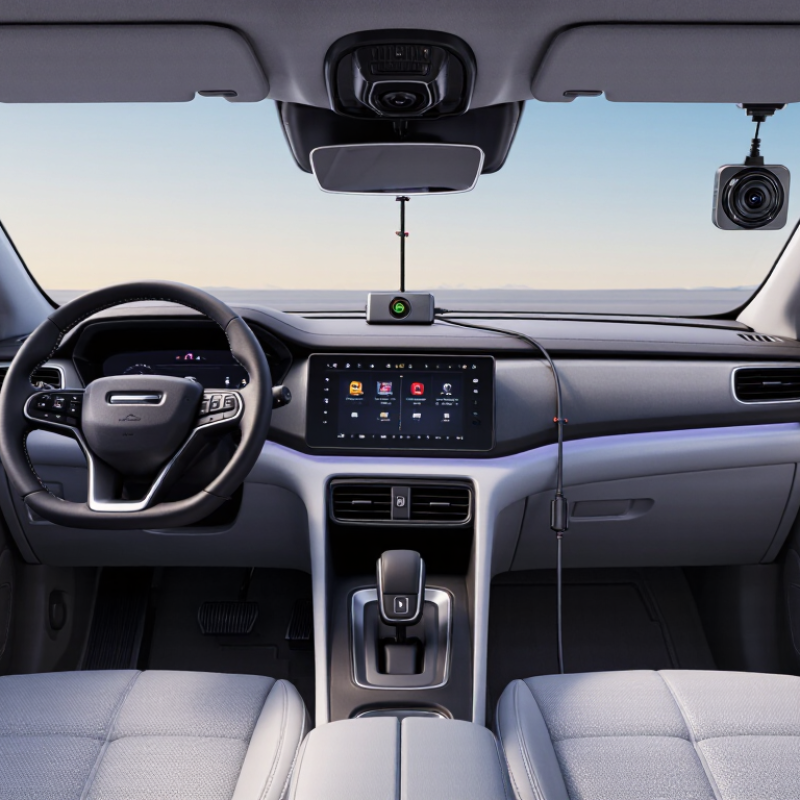
Why Hide Cables for Dash Cams and Radar Detectors?

Identify the Risk: NHTSA Logged 12,151 Speeding Deaths in 2022

Why Hide Cables for Dash Cams and Radar Detectors?

Identify the Risk: NHTSA Logged 12,151 Speeding Deaths in 2022

Speeding is not an abstract statistic. NHTSA recorded 12,151 speeding-related deaths in 2022, representing about 29% of all traffic fatalities that year. The agency also reported that speeding contributed to thousands of preventable injuries. These figures make every distraction worth examining, including a loose power cable near the driver’s hands or feet.

A concealed cable can reduce snagging near the steering wheel, pedals, and door frame. It also helps preserve clear visibility through the windshield. However, installation must respect curtain airbags and other safety equipment. Routing a wire carelessly along an airbag path can create a serious hazard during a crash. The Insurance Institute for Highway Safety consistently emphasizes that safe driving depends on attention, restraint use, and proper vehicle operation.

A neat installation is not a substitute for responsible speed. It is only one small risk-control measure. Many drivers focus on camera placement but overlook cable tension, heat exposure, or a dangling connector. That is an understandable mistake. A careful inspection should confirm that the cable stays secure, does not obstruct controls, and remains compatible with the vehicle’s safety systems. Radar-based alerts can support awareness when used lawfully, but they should never encourage faster driving or replace judgment.

Plan Clear Cable Paths Using FMVSS No. 111 Visibility Requirements

A clean cable path is more than a cosmetic choice. It protects the driver’s view and supports safer equipment placement. FMVSS No. 111 focuses on rear visibility, including the required view of a 10-foot by 20-foot zone behind the vehicle. It does not specifically regulate dash-cam or radar-detector cables, but its visibility principle matters during installation.

Route cables along the windshield edge, then behind trim or the headliner. Keep them away from the driver’s direct sightline, mirror area, and camera image. Leave enough slack near bends, but avoid hanging loops near airbags or pedals. NHTSA’s Final Rule on rear visibility estimated that compliant systems could prevent 58 to 69 fatalities and approximately 42,000 injuries each year. Small installation decisions deserve similar care.

My first routing plan was too optimistic. A cable looked hidden from the passenger seat, yet it crossed the driver’s view. I rechecked it from the normal driving position. That step revealed the problem. The IIHS has repeatedly noted that visibility aids cannot remove every backing risk, especially when drivers rely on technology without checking surroundings. Test the layout in daylight and darkness. Check reflections, windshield-wiper travel, and the rear display image. A tidy route can still be poorly placed. Visibility comes first.

Why Hide Cables for Dash Cams and Radar Detectors? – Plan Clear Cable Paths Using FMVSS No. 111 Visibility Requirements
Planning Dimension Verified Requirement or Reference Value Why It Matters Cable-Path Planning Action Practical Verification
FMVSS No. 111 scope Rear visibility and rearview image performance FMVSS No. 111 addresses the driver's required view to the rear through the rearview system. It does not prescribe a specific routing method for dash-cam or radar-detector cables. Keep cables, connectors, and excess loops away from the rearview mirror area and any camera view used for rear visibility. Confirm that the cable installation does not cover or interfere with the vehicle's rearview display, mirror, or camera image.
Required rear visibility zone 10 ft wide × 20 ft long; the zone extends from 5 ft to 20 ft behind the vehicle
(approximately 3.05 m wide × 6.10 m long; from 1.52 m to 6.10 m behind)
The rearview system must provide the required field of view behind the vehicle under the applicable standard. Do not place a rear camera cable, trim splice, or accessory mount where it can block the camera lens or reduce the displayed rear zone. With the vehicle stationary, inspect the rearview image and verify that the required area remains visible.
Rearview image activation The required rearview image must be displayed within 2 seconds after the rear visibility system is activated. Improperly routed or pinched wiring can cause intermittent operation, delayed activation, or loss of the rearview image. Use protected routing, secure connectors, and avoid sharp bends near the tailgate, liftgate, or trunk hinge. Activate the rear visibility system repeatedly and check for consistent image availability within the required response time.
Forward windshield clearance No single FMVSS No. 111 cable-clearance dimension is specified for a dash cam or radar detector. Although FMVSS No. 111 concerns rear visibility, loose cables can obstruct the driver's forward view, create glare, or become a distraction. Route the cable along the upper windshield edge or another concealed path without placing slack across the driver's sightline. From the normal driving position, check that no cable, plug, adhesive pad, or loop crosses the forward viewing area.
Rearview mirror area Keep the mirror, its adjustment range, and the surrounding viewing area unobstructed. A cable wrapped around the mirror stem or routed across the mirror can reduce rearward visibility and interfere with mirror adjustment. Leave a clean service loop near the device, then guide the cable laterally along the headliner rather than across the mirror face. Adjust the mirror through its normal range and confirm that the cable does not touch the glass or restrict movement.
Airbag deployment zones No universal FMVSS No. 111 distance is provided for cable routing around airbags. Side-curtain and front airbag deployment paths vary by vehicle. A cable tucked into an incorrect trim gap can become a hazard during deployment. Follow the vehicle service information for A-pillar, roof-rail, dashboard, and side-curtain-airbag routing. Do not attach cables to an airbag module or its deployment cover. Verify the routing against the vehicle-specific service procedure before reinstalling trim panels.
Cable slack management No loose loop should hang into the driver's view, controls, pedals, or steering-wheel area. Unsecured slack can become a visual distraction, snag on controls, or fall into the footwell. Measure only the length needed to reach the power source, secure the cable at regular intervals, and conceal excess behind approved trim areas. Perform a final movement check with the steering wheel, pedals, doors, and seat positions in their normal operating ranges.
Power-source location Select a fused, vehicle-approved power connection appropriate for the accessory's electrical load. Routing a cable directly across the windshield or dashboard can create unnecessary exposure and interfere with visibility. Plan the path from the device to a concealed power point before installing adhesive mounts or replacing trim. Check that the accessory powers on reliably and that the cable does not cross any transparent viewing area.
Driver eye-line check The final installation should remain outside the driver's normal forward and side observation areas. Visibility depends on driver seating position, vehicle design, and device placement; a cable that is clear for one driver may be distracting for another. Evaluate the installation from the driver's normal seating position, not from outside the vehicle. Check the view with the driver seated normally, the mirror adjusted, and the device powered on in both daytime and nighttime conditions.
Final compliance distinction FMVSS No. 111 is a vehicle safety standard; cable concealment is an installation practice. Passing a cable-routing inspection alone does not establish compliance with every applicable vehicle, glazing, electrical, or state requirement. Use the standard as a visibility-planning reference and also follow the vehicle manufacturer's service instructions and applicable local requirements. Document the selected path, verify visibility and airbag clearance, and complete a road-use safety check before regular operation.

Protect Occupants by Avoiding FMVSS No. 208 Airbag Deployment Zones

Why Hide Cables for Dash Cams and Radar Detectors?

A concealed cable is more than a cleaner visual detail. It helps keep wires away from FMVSS No. 208 airbag deployment zones. This federal standard sets occupant protection requirements for frontal crashes, including airbag performance and seating positions. A cable crossing the steering wheel, dashboard edge, or pillar trim may enter an expanding airbag’s path. It could also become loose during a collision.

NHTSA estimates that frontal airbags saved 50,457 lives from 1987 through 2017. That protection depends on correct deployment and proper occupant positioning. The agency also warns that airbags inflate within milliseconds. Therefore, routing matters. Keep wiring behind approved trim channels, away from airbag covers, and clear of side-curtain airbag paths. Never press a cable beneath a marked airbag panel.

Practical installation still requires judgment. A hidden wire is not automatically a safe wire. Avoid sharp bends, hot surfaces, moving pedals, and steering components. Leave enough slack near powered devices, but prevent loops from hanging near occupants. FMVSS No. 208 does not provide a simple “cable placement” diagram for every vehicle. Vehicle service information remains essential. That detail is easy to overlook. The source reference is NHTSA, Federal Motor Vehicle Safety Standard No. 208, Occupant Crash Protection, alongside its Air Bag Safety materials.

Choose Materials Meeting FMVSS No. 302’s 102 mm/min Burn-Rate Limit

Why Hide Cables for Dash Cams and Radar Detectors?

Hidden wiring creates a cleaner cabin and reduces snagging near the steering wheel, pedals, and door seals. It can also prevent loose cables from interfering with airbags or distracting the driver. However, neat installation is not enough. Materials matter, especially when cables pass behind trim or beneath dashboard panels.

FMVSS No. 302 sets a maximum horizontal burn rate of 102 mm/min for certain vehicle interior materials under specified test conditions. Choose cable jackets, sleeves, clips, and insulating materials supported by reliable test documentation. A compliant material does not automatically make the entire installation compliant. Routing, mounting, nearby surfaces, and heat exposure still require careful judgment. I have learned that a cable can look secure during installation yet shift after repeated vibration. That small mistake deserves attention.

Tips:

Check the supplier’s test records and material specifications. Keep wiring away from airbag deployment paths, sharp brackets, heaters, and moving pedals. Use secure clips instead of loose adhesive alone. Leave gentle slack at connection points, but avoid hanging loops. Inspect the route after several drives. It is easy to overstate compliance. FMVSS No. 302 testing should support material selection, not replace professional installation review.

Power and Test Both Devices: Check Fuses, Heat, Snags, and Signal Loss

Why Hide Cables for Dash Cams and Radar Detectors?

A clean cable route improves safety, testing, and daily reliability. Before hiding anything, power the dash cam and radar detector together. Use a multimeter to identify an ignition-switched fuse, then verify its voltage with the engine running. Avoid circuits linked to airbags or other safety equipment. A loose fuse connection can cause random restarts, so test it twice.

My first installation looked tidy, but I missed a sharp trim edge. The cable insulation later showed a small cut. Check every bend, clip, and entry point.

Cables should not cross pedals, steering parts, or airbag paths. Leave gentle slack near movable panels. Do not force the trim closed. Pinching creates faults that may appear weeks later.

Tips: After a 30-minute drive, touch the power adapter carefully. Warm is normal; unusually hot is a warning. Test both devices during daylight and at night. Watch for camera recording gaps, detector resets, or reduced alerts. Confirm the dash cam keeps its settings after ignition shuts off. Also check the radar detector’s forward view. Hidden wiring should not block its antenna, camera lens, or windshield area. Metalized glass and nearby electronics may affect reception, though the cable itself is not usually the cause. I still recheck signal performance after moving the wire, because assumptions can be wrong.

FAQS

Why should cables stay outside the driver’s direct sightline?

Clear glass supports safer driving. Route cables along the windshield edge, behind trim, or inside the headliner. Keep mirrors and camera views clear. A hidden cable can still obstruct vision.

How can I check whether a cable blocks visibility?

Sit in the normal driving position and inspect the windshield in daylight. Then check after dark. Reflections may appear later. Review mirror areas, wiper movement, and the rear display image.

Where should cables avoid airbag deployment zones?

Keep wiring away from steering wheels, dashboard edges, pillar covers, and marked airbag panels. Never press a cable under an airbag cover. Airbags deploy within milliseconds.

Is a completely hidden cable always safe?

No. A concealed wire may still cross an airbag path or touch a sharp trim edge. Check heat, movement, and pressure points. Hidden does not mean safe.

How should I test power before concealing the wiring?

Power both devices first. Use a multimeter to identify a suitable ignition-switched circuit. Avoid circuits connected to airbags or other safety equipment. Test voltage with the engine running. Test twice.

What physical problems should I check along the cable route?

Look for sharp bends, crushed sections, hot surfaces, pedals, and steering parts. Leave gentle slack near movable panels. Do not force trim closed. Small damage can grow.

How can I test the installation after driving?

Drive for about 30 minutes, then carefully check the power adapter. Warm is normal; unusually hot is concerning. Watch for recording gaps, device resets, or lost settings. Recheck the cable afterward.

Can cable placement affect camera or detector performance?

It can, especially near metalized glass or nearby electronics. Keep the camera lens and forward sensing area clear. Test reception in different locations. My first assumption was wrong, so I rechecked it.

Conclusion

Hiding cables for dash cams and radar detectors is more than a cosmetic upgrade; it is an important safety step. In 2022, NHTSA recorded 12,151 speeding-related deaths, highlighting the value of responsible driver awareness and properly installed technology. Learning how to hide cables for dash cams and radar detectors can reduce distractions, keep the windshield area clear, and create a cleaner cabin. Plan cable routes along existing trim and away from the driver’s direct field of view, while considering the visibility principles associated with FMVSS No. 111.

Safety should remain the priority during installation. Keep wires outside airbag deployment zones covered by FMVSS No. 208, and select materials that comply with the 102 mm/min burn-rate limit referenced by FMVSS No. 302. After installation, power both devices and inspect fuse capacity, heat buildup, loose sections, snag points, and possible signal loss. A final roadworthiness check should confirm that cables remain secure, controls are unobstructed, and both devices operate reliably without creating new hazards.

Amelia

Amelia

Amelia is a seasoned marketing professional with a wealth of expertise in our company’s core offerings. With an unwavering passion for driving growth and innovation, she plays a pivotal role in shaping our marketing strategies and enhancing brand visibility. A key aspect of her responsibilities......